
Building a Serverless AI Bartender - Part 3: The AI Chat Agent

Questo file e stato tradotto automaticamente dall'IA, potrebbero verificarsi errori
In Part 1 I built the foundation with Aurora DSQL, APIs, and event-driven workflows. In Part 2 I added guest registration and live order updates with AppSync Events. Guests can browse drinks and place orders. But it's still just a digital menu.
This is where the AI comes in. The main point of this small project was that I should not have to be the menu. I wanted a digital menu but also an AI Cocktail Assistant that could recommend drinks instead of me. I needed to build something that understands preferences, recommends drinks, but only suggests drinks I actually can make.
That last part came with several challenges; it took me a few extra days to get things the way I wanted. The first time I tested the chatbot, it recommended a "Mojito", but I didn't have "Mojito" on the menu. The AI suggested good drinks but didn't check if it was possible to mix it. I learned that building AI agents isn't just about connecting to a language model. It's about controlling what the model can and cannot say.
The full source code for this project is available on GitHub.
Let's go and build the AI bartender.
The Bartender in Action
Before diving into the technical details, let me show you what we're building. This is the actual chat interface that guests can use.
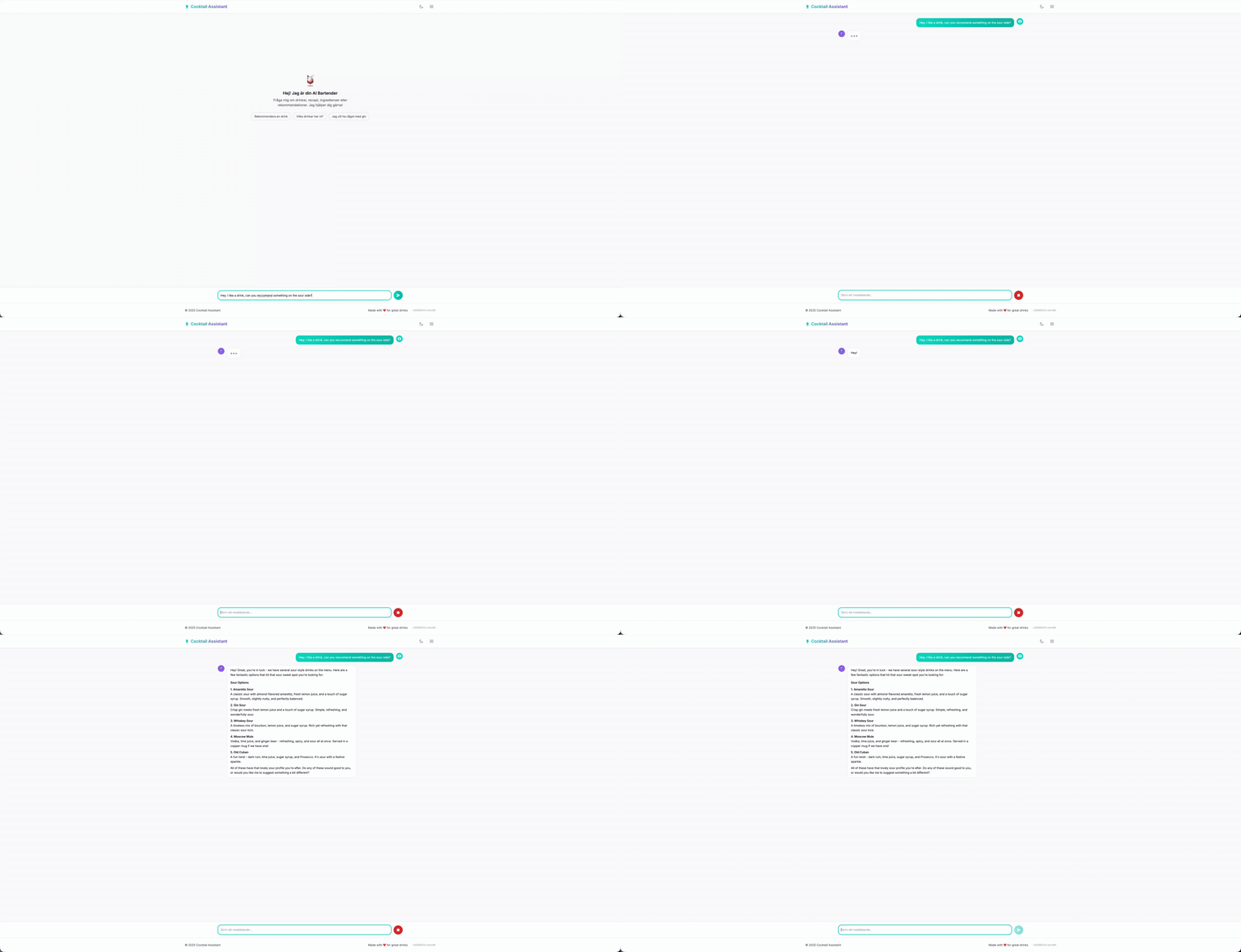
The conversation flows naturally; the user asks for drinks, adds their preference like sweet, sour, bitter, and so on. The bartender follows up, fetches the menu, and recommends drinks that actually exist. When someone asks for something we don't have, it politely redirect instead of making things up.
What you don't see is everything happening behind that interface. The agent calls my MCP tools to fetch the menu, loads conversation history from AgentCore Memory, streams the response word by word through Lambda Web Adapter, and follows strict rules to prevent hallucinations. All invisible to the guest. All making the experience feel like talking to a real bartender.
Architecture overview
Let's take a look at the architecture and the services that we will use to build the AI Bartender chat bot.
I have the frontend in React calling AWS Api Gateway; this is created and set up with streaming response. To implement the logic I of course turn to Lambda, which is set up as integration with the API. To handle the agentic loop in an easy way, Strands Agents come to the rescue. Our Lambda function, with Strands, then interacts with Amazon Bedrock and uses Amazon Nova 2 Lite as LLM. Amazon AgentCore provides a few very important parts: memory to keep the conversation and gateway to reach my MCP tools. This creates a stable, cost-effective, and serverless solution!

Streaming Chat API
The first thing I needed was to create an API endpoint for the chat. We already have an API Gateway from Part 1 and 2 that handles all the REST endpoints: browsing drinks, managing the menu, placing orders. My first instinct was to just expand on that API and add a /chat route there. That didn't really work the way I wanted.
The main API uses SAM's Events property on Lambda functions to define endpoints. That is normally how I set it up, even if it has a few flaws. It's just too simple for standard request-response patterns, not to. But I needed response streaming for the chat, and SAM Events don't support responseTransferMode at the moment. There was simply no way to configure it through the normal way.
To make this work I had to use an OpenAPI spec and set the responseTransferMode to STREAM, since it would not be possible to keep the current API and just add OpenAPI spec for the new endpoint; the solution became a new dedicated stack for the chat API. So I created a separate AWS::Serverless::Api with an OpenAPI DefinitionBody. A benefit that comes with this is that I decouple the APIs; I can deploy the REST-based menu API and AI Chat API separately. Chat changes don't risk breaking the ordering flow and vice versa.
paths:
  /chat:
    post:
      x-amazon-apigateway-integration:
        type: aws_proxy
        httpMethod: POST
        responseTransferMode: "STREAM"
        uri:
          Fn::Sub: >-
            arn:aws:apigateway:${AWS::Region}:lambda:path/2021-11-15/functions/${ChatStreamingFunction.Arn}/response-streaming-invocations
First, as already mentioned, responseTransferMode: "STREAM" tells API Gateway to stream the response instead of buffering it. Second, the URI path uses /response-streaming-invocations instead of the normal /invocations. This is a different Lambda invocation API that supports chunked transfer. Without both of these, API Gateway would wait for the full Lambda response before sending anything to the client.
Response Streaming
Why go through all this trouble and jump through all of these hoops just for streaming? Because the difference in user experience is huge.
The first version I built of the chat was synchronous; it was just easier that way. The Lambda waited for the full response from Bedrock, then returned everything at once. But it didn't flow naturally; everyone these days is used to responses coming in streams. ChatGPT, Claude, Gemini, and basically all AI chats are built that way.
With streaming, the user sees the first word in milliseconds instead of waiting seconds for the full response. The rest flows in word by word; in the end the total time is about the same, but it feels so much smoother and, as humans, we experience it as more natural.
The technical term for all of this is "time to first token" versus "time to last token". For buffered responses, both are the same. For streaming, time to first token is typically under a second. That first token is what matters!
There's a practical benefit too. If the model starts generating nonsense or gets stuck in a loop, the user sees it immediately and can cancel.
Lambda Web Adapter for Python Streaming
Now, there is one catch to all of this. Python Lambda doesn't natively support response streaming. Only Node.js has built-in streaming support through Lambda's response streaming API. But I wanted to build the agent in Python because Python is my go-to language, and since everything else in the backend is Python-based, I wanted to try and keep it like that.
The solution here is to use Lambda Web Adapter. It's an AWS-published Lambda layer that wraps your web framework—in my case FastAPI—and translates between Lambda's streaming invocation API and standard HTTP responses. You write a normal FastAPI app with StreamingResponse, and the adapter handles the rest.
ChatStreamingFunction:
  Type: AWS::Serverless::Function
  Properties:
    CodeUri: src/chat-streaming/
    Handler: run.sh
    Runtime: python3.13
    Architectures:
      - arm64
    Timeout: 120
    MemorySize: 1024
    Layers:
      # Lambda Web Adapter layer published by AWS
      - !Sub arn:aws:lambda:${AWS::Region}:753240598075:layer:LambdaAdapterLayerArm64:25
    Environment:
      Variables:
        AWS_LAMBDA_EXEC_WRAPPER: /opt/bootstrap
        PORT: 8080
        AWS_LWA_INVOKE_MODE: RESPONSE_STREAM
There are three environment variables that make this work in the end. AWS_LAMBDA_EXEC_WRAPPER tells Lambda to use the adapter as the entry point instead of calling your handler directly. PORT tells the adapter where your FastAPI app is listening. And AWS_LWA_INVOKE_MODE set to RESPONSE_STREAM enables the chunked transfer encoding that makes streaming possible.
The Lambda handler is just a small two-line shell script that will start the FastAPI server.
#!/bin/bash
exec python handler.py
The adapter will intercept the requests from Lambda's streaming API, forwards them to FastAPI over HTTP on port 8080, and then stream the response back chunk by chunk. From my code's perspective, I'm just writing a normal FastAPI app. The streaming part is handled entirely by the layer.
So in the end, this becomes a pretty smooth solution. You can find the solution on Serverless Land as well.
Inside the Chat Lambda
With the API and streaming in place, let's have a look at what actually runs inside the Lambda function.
Strands Agents
When building an AI agent from scratch we have to implement a lot of things: sending the user's message to the model, checking if the model wants to call one of our tools, calling the tool, sending the result back to the LLM, checking again, and keeping looping until the model has a final response. Basically we need to implement what is often referred to as the Agentic Loop. Then add streaming, error recovery, and conversation state on top.
Strands Agents is an open-source SDK from AWS to help us implement the Agentic Loop. It helps us reduce implementation time from weeks to days. It will run the agentic loop for us. When the model decides it needs to check the menu, Strands invokes the tool call, feeds the result back, and continues until the model is happy and has a complete answer. It also integrates directly with AgentCore Memory for session management and supports async streaming.
The basic setup is surprisingly easy.
from strands import Agent
from strands.models.bedrock import BedrockModel

model = BedrockModel(model_id="amazon.nova-2-lite-v1:0")
agent = Agent(model=model, system_prompt="You are a bartender.")

for chunk in agent.stream("Suggest a gin drink"):
    print(chunk, end="")
Three lines and you have a streaming AI agent. Strands owns the loop; I own the business logic.
Amazon Bedrock Nova 2
For the LLM, I opted for Amazon Nova 2 Lite. Why Nova 2 specifically? I wanted a fast model; recommending cocktails and drinks is not a very complex task, so a smaller, faster model should be able to perform the job just fine. Response time matters, and a smaller model is faster.
From the start my thought was to use Nova Pro and Nova Lite with Amazon Bedrock Intelligent Prompt Routing to switch between the models depending on complexity of the user input. However, for some reason Nova Pro struggled a bit on the tool usage, and to be honest, using a pro model for this is a complete waste. So in the end I just ditched that idea.
The Nova 2 Lite model is a great step up from the first generation Nova. The model is fast, cheap, and follows instructions very well. More importantly, it calls tools reliably and doesn't hallucinate as much when you give it strict constraints.
AgentCore Memory
As we all know, Lambda functions are stateless; each invocation starts fresh. In a multi-turn conversation this doesn't work. If I ask "I like gin" and then "what do you recommend?", the second Lambda invocation has no idea you mentioned gin in the first interaction. Sure, we could store things in the Lambda memory, but in a multi-user system that will not fly. I'm not sure what instance of the Lambda runtime my interaction ends up with. We need external memory.
AgentCore Memory solves this by storing conversation history in a central place; all Lambda invocations can read from this memory to have the conversation fresh. Each user that interacts with the AI gets a session, and the memory persists across invocations based on that session ID. When the agent receives a new message, it loads the conversation history from memory, processes the message with full context, and saves the updated history back.
BartenderMemory:
  Type: AWS::BedrockAgentCore::Memory
  Properties:
    Name: drink_assistant_bartender_memory
    EventExpiryDuration: 30  # Days to keep conversation events
    MemoryStrategies:
      - UserPreferenceMemoryStrategy:
          Name: DrinkPreferences
          Description: Extracts user drink preferences
          Namespaces:
            - preferences/{actorId}
The UserPreferenceMemoryStrategy makes things interesting. It extracts insights from conversations; if a user says "I prefer gin" multiple times across sessions, the memory learns this and makes it available for future conversations. Short-term memory stores the raw conversation events, and long-term memory stores the extracted patterns.
In the chat Lambda, I set up the Strands session manager to use the memory—a very clean and easy setup.
from bedrock_agentcore.memory.integrations.strands.session_manager import (
    AgentCoreMemorySessionManager
)

session_manager = AgentCoreMemorySessionManager(
    agentcore_memory_config=AgentCoreMemoryConfig(
        memory_id=MEMORY_ID, session_id=session_id, actor_id=actor_id
    ),
    region_name=REGION,
)
The Agent Without Tools
At this point, I have a basic working agent. It can give recommendations about drinks via the Nova 2 LLM.
model = BedrockModel(
    model_id="global.amazon.nova-2-lite-v1:0",
    region_name=REGION,
)
session_manager = create_session_manager(session_id, actor_id)

agent = Agent(
    model=model,
    system_prompt=SYSTEM_PROMPT,
    session_manager=session_manager,
)
This agent can chat and interact with the user; it can remember context across messages. It will sound like a bartender, but it is missing one important thing that we touched upon in the start. It has no access to the actual drink menu; if we ask for a recommendation it will suggest any drink that the LLM comes up with. It will suggest a Tequila-based cocktail even if I don't have any Tequila. It will for sure happily suggest a Mojito, a Cosmopolitan, or any other amazing cocktails there is. It doesn't know what I can actually make; that's what I need to solve next.
MCP Providing the Agent Access to Data
Our LLM in Nova for sure knows about thousands of cocktails, as we have already touched on. But I only want it to suggest the drinks on the menu. I could of course supply the entire menu in the system prompt, but that would not scale as the menu grows, and if I like it to suggest things outside of the menu just as long as I have the ingredients, well then it would not work at all; it would not be practical.
The solution of course lies in MCP, Model Context Protocol. It's a standard for giving the LLM tools to use—tools that can fetch data, as the menu for example. Then the model decides during the conversation that it needs menu information, calls a tool, gets the data back, and uses it in the response.
The flow works something like this: A user asks "what gin drinks do you have?" The agent will recognize that it needs the menu to answer that question. It makes a tool call for, in this case, getDrinks. The tool, implemented in a Lambda function, queries the database and returns the drink list. Now, the agent receives that list and recommends only drinks that are actually on the menu.
At the moment I have only implemented the getDrinks tool, but the architecture is flexible, and building out additional tools is easy. For example, a getIngredients tool that returns what I have in stock, a getPopular tool that ranks drinks by order count, an orderDrink tool to place an order. Each tool is just another Lambda function behind the AgentCore Gateway; the agent gets smarter without the system prompt getting longer.
Implementing MCP with AgentCore Gateway
AgentCore Gateway makes it easy to host and supply tools to the LLM. It supports multiple different target types: OpenAPI Schema, Lambda, and other external MCP servers. When I started to build out the tool my first plan was to use OpenAPI Schema and point it at the existing REST API—just reuse what I had already built. Make sense, right?
Wrong! I ran into some problems and concerns that made me rethink this.
Swapping to Lambda Targets from OpenAPI
The first hurdle I ran into was a gap in the CloudFormation support. OpenAPI targets require an API key credential provider for authentication; the Gateway needs credentials to call my API on its behalf. And here's the catch: CloudFormation has no native resource for ApiKeyCredentialProvider. I would have to create it manually through the console or use a Lambda-backed Custom Resource. I'm not a huge fan of Custom Resources as it adds operational complexity. For a credential that's basically set and forget, this overhead isn't worth it.
The second problem turned out to be even more important: contract coupling. The current API was built to serve content to my webapp; it returned what the UI needed to render. The MCP tool for sure has different requirements; as an example, it doesn't need the image URL—it just makes no sense.
For the AI Agent, a compact flat JSON response would be the most optimal. I could in most cases even return just the drink name; the LLM knows what an "Gin & Tonic" or "Moscow Mule" is. It is only for my own custom drinks I might need to return more information to the model.
So I had a few choices here: either I implement the "Backend For Frontend" architecture pattern and create a BFF for each client in front of the REST API, or I totally change and just create a Lambda target for AgentCore Gateway. In the end I opted for the second approach.
# MCP Tool Response (optimized for agent)
{
    "drinks": [
        {"name": "Negroni", "ingredients": "gin, Campari, sweet vermouth"},
        {"name": "Gin & Tonic", "ingredients": "gin, tonic water, lime"}
    ],
    "count": 2
}

# vs REST API Response (optimized for frontend)
{
    "items": [...full drink objects with IDs, images, sections...],
    "pagination": {"page": 1, "total": 50, "hasMore": true},
    "meta": {"cached": true, "timestamp": "..."}
}
The benefit with this approach is that the API and the MCP tool can evolve independently. When I add new fields to the REST API for frontend features, the agent isn't affected. Creating a clear decoupling.
The getDrinks Tool
To implement the getDrinks tool the Lambda function connects to our DSQL database and fetches the list of drinks. I will not go into how that connection works; see Part 1 for details around that.
def handler(event, context):
    """MCP tool handler, called by AgentCore Gateway."""
    section_id = event.get("section_id")
    rows = get_drinks_from_db(section_id)

    # Return compact format for the model
    drinks = [
        {"name": row["name"], "ingredients": ", ".join(row["ingredients"])}
        for row in rows
    ]

    return {"drinks": drinks, "count": len(drinks)}
The response format matters. I initially returned full drink details including descriptions, image URLs, and IDs. There is no point in doing that, and it would only consume tokens; trimming it down increases the speed and is more cost-efficient.
Gateway CloudFormation
To create our AgentCore Gateway as normal I turn to CloudFormation, and the setup is not pretty straightforward.
BartenderGateway:
  Type: AWS::BedrockAgentCore::Gateway
  Properties:
    Name: drink-assistant-bartender-gateway
    ProtocolType: MCP
    AuthorizerType: AWS_IAM

DrinksToolsTarget:
  Type: AWS::BedrockAgentCore::GatewayTarget
  Properties:
    GatewayIdentifier: !Ref BartenderGateway
    TargetConfiguration:
      Mcp:
        Lambda:
          LambdaArn: !GetAtt McpToolsFunction.Arn
          ToolSchema:
            InlinePayload:
              - Name: getDrinks
                Description: >
                  Retrieves available cocktails from the menu.
                  Returns drink names and ingredients.
The AgentCore Gateway uses IAM authentication with a GATEWAY_IAM_ROLE credential provider. The tool description is important; it tells the model when and how to use the tool. A short and vague description leads to the model calling the tool at wrong times or not calling it at all when it should.
Adding MCP to the Agent
Now that we have the MCP ready to use via AgentCore we need to supply it to the Strands agent so it can call it.
from strands.tools.mcp import MCPClient
from mcp_proxy_for_aws.client import aws_iam_streamablehttp_client

mcp_client = MCPClient(
    lambda: aws_iam_streamablehttp_client(GATEWAY_URL, "bedrock-agentcore")
)
tools = mcp_client.list_tools_sync()
The MCPClient from Strands handles the MCP protocol, and mcp-proxy-for-aws adds IAM authentication to call the AgentCore Gateway. I initialize the client once at cold start and cache the tools in a global context so subsequent requests skip the setup, to improve the speed of warm starts.
tools = get_mcp_tools()

agent = Agent(
    model=model,
    system_prompt=SYSTEM_PROMPT,
    session_manager=session_manager,
    tools=tools,
)
With one single added line the agent can now call the getDrinks tool when it needs to check the menu.
Creating the system prompt
The system prompt is what will guide the LLM and set up requirements and structure. Remember the Mojito problem from the introduction? That is what we will avoid with the system prompt.
First draft
My first system prompt was just too simple and short; it provided very little guidance.
System: You are a helpful bartender. When guests ask for drink recommendations,
use the getDrinks tool to see what's available and make suggestions based on
their preferences.
The result was polite but unreliable.
Round two, adding constraints
In the second iteration I added some explicit restrictions and guardrails.
System: You are a bartender. Use the getDrinks tool to see what drinks are
available. Only recommend drinks that appear in the tool response. Do not
suggest drinks that are not on the menu.
Better, but it still didn't provide what I wanted.
Third iteration
Now I started to add some clear rules.
System: You are a bartender at a Nordic cocktail bar.

RULES:
- ALWAYS call getDrinks before making recommendations
- ONLY recommend drinks that exist in the getDrinks response
- If a drink is not in the response, say "Sorry, we don't have that"
- Do not describe recipes or ingredients unless they come from the tool

Use descriptive language (fresh, balanced, citrusy) when discussing drinks.
This was much better; the LLM stopped suggesting drinks that were not on the menu. But when guests asked vague questions like "surprise me" or "what's popular?", the LLM would sometimes skip the tool call entirely and recommend drinks it knows about; the key word "ALWAYS" wasn't always enough.
Final iteration
In the end I created a long system prompt, actually with help from AI. Using AI to create prompts for AI is actually a very good approach and it creates very good results.
SYSTEM_PROMPT = """# BARTENDER AGENT

## CRITICAL RULES - READ FIRST

**YOU MUST NEVER:**
- Suggest drinks that are NOT in the getDrinks result
- Make up ingredients or drinks that don't exist on the menu
- Recommend a drink without first calling getDrinks

**IF A DRINK IS NOT ON THE MENU:**
Say ONLY: "Sorry, we don't have that on the menu. Can I suggest something else?"

**LANGUAGE RULE:**
- Detect the user's language and respond in the same language
- If user writes in Swedish, respond in Swedish

---

## TOOLS

### getDrinks
Fetches drinks from our menu.
- ALWAYS call this tool when the guest asks for recommendations
- This is your ONLY source for drink information
- Recommend ONLY drinks that exist in the response

## IDENTITY
...
## CONVERSATION FLOW
...
## LIMITATIONS
...
"""
Putting "CRITICAL RULES - READ FIRST" at the top with bold formatting signals importance; "YOU MUST NEVER" is stronger than "do not" or "avoid", and specifying exactly what to say when a drink isn't available removes ambiguity; the model doesn't have to figure out how to phrase a rejection.
I also added the language detection rule after noticing the agent answered in English even when I asked in Swedish. These can feel like small details, but they add up to a better experience.
Testing
After each prompt iteration, I ran the same test scenarios, so that way I could track the improvements easier than if I just asked random things.
- Direct match: "I'd like a Negroni" (we have it)
- No match: "Can I get a Piña Colada?" (we don't have it)
- Vague request: "Something refreshing with gin"
- Challenge: "What about a Mojito with watermelon?" (testing if it invents variations)
- Off-topic: "What's the weather like?" (should stay in character)
The final prompt passed all five tests with flying colors. Earlier versions would fail some of the scenarios.
When building AI agents, the system prompt is one of our primary controls. It's important that we are explicit, repetitive, and put the most important rules where the model sees them first.
The Agentic Loop
I have already mentioned the Agentic Loop a few times, but what is it in detail? How does it really work? I will try and explain that.
A user starts by asking the agent a question or giving it a direct order—something like "I want something with gin" in the React frontend. The frontend POSTs this to the /chat endpoint. API Gateway invokes the streaming Lambda via the /response-streaming-invocations, and the Lambda Web Adapter starts FastAPI, which handles the request. The Lambda handler loads MCP tools, initializes Strands agent which will start everything.
Strands starts by sending the user's message to Nova 2 LLM along with the system prompt that we defined earlier, and any conversation history from previous messages, fetching it from AgentCore Memory. The model reads the system prompt, sees the critical rules about always calling getDrinks, and decides it needs menu data before it can recommend anything; this makes it do a tool call.
Strands picks up the result from the tool call and feeds that result back to the model.
Now the model has the actual menu, does a filter for gin-based drinks, considers the guest's other preference, and creates a recommendation. Each token now streams back through Strands, through FastAPI's StreamingResponse, through API Gateway, and into the frontend, and AgentCore Memory saves the conversation for next time.
Here's the core of the streaming endpoint.
async def stream_response():
    agent = Agent(
        model=model,
        system_prompt=SYSTEM_PROMPT,
        tools=get_mcp_tools(),
        session_manager=create_session_manager(session_id, actor_id),
    )

    async for event in agent.stream_async(message):
        if isinstance(event, dict) and event.get("data"):
            yield f"data: {json.dumps({'chunk': event['data'], 'sessionId': session_id})}\n\n"

    yield f"data: {json.dumps({'done': True, 'sessionId': session_id})}\n\n"

return StreamingResponse(stream_response(), media_type="text/event-stream")
The stream_async method is where the agentic loop lives. Strands handles the needed back and forth between the model and tools internally. From my code's perspective, I just iterate over events and yield text chunks as Server-Sent Events. Strands decides when the model needs another tool call versus when it's ready to respond.

Cost
For occasional home use, this is essentially free.
| Component | Cost |
|---|---|
| Bedrock Nova 2 Lite | ~$0.001/1K input, ~$0.002/1K output tokens |
| Lambda | ~$0.0000166 per GB-second |
| AgentCore Memory | Included with Bedrock |
| AgentCore Gateway | Included with Bedrock |
| Aurora DSQL | Pay per request, minimal for low traffic |
A typical conversation costs fractions of a cent. Even with a party of 20 people asking questions all evening, the total would be under a dollar.
What's Next
The AI Bartender is now complete; all the three parts are done.
In Part 1 I covered the serverless foundation with Aurora DSQL, APIs, authentication, and event-driven image prompt generation. Part 2 added guest registration with invite codes, self-signed JWTs, and real-time order updates with AppSync Events. In this final Part 3 I built the AI chat agent with Strands, MCP tools, AgentCore Memory, and response streaming.
Future ideas include expanding the tools, adding ingredient inventory, maybe from an image. Only my own imagination sets the limitations.
Final Words
What started as a solution to stop being the human drink menu at a home party turned out to be a deep dive into serverless, event-driven, and AI. Each part came with its own challenges and problems that were great fun to solve.
The full source code is available on GitHub.
Check out my other posts on jimmydqv.com and follow me on LinkedIn and X for more serverless content.
Now Go Build!